UniColor Photo1.5
Publisher Description
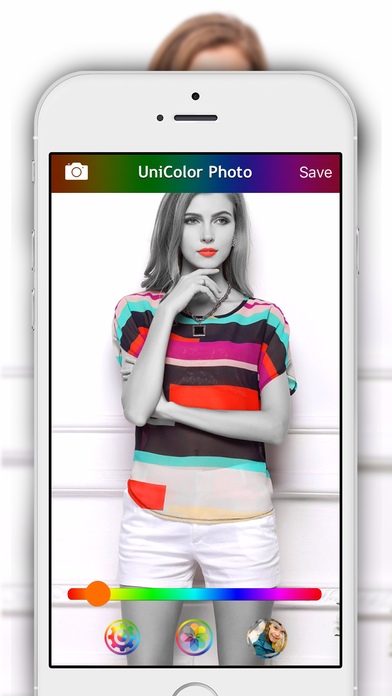
Give a dramatic look to your photos by converting them to black & white while keeping your chosen colors. This effect draws the viewers' attention to the colored areas, creating striking photos.
No painting required, just double tap to select the color or use the slider.
Moreover, you can also remove one or two colors of your choice to make the other colors stand out, and swap the color focus with another color of your choice.
With UniColor Photo, you customize your photos with no quality loss !
UniColor Photo is compatible with the iPhone 4S and newer, and all iPads. UniColor Photo is not compatible with the iPhone 4 and older iDevices.
Features:
Super easy ! Just move the slider to select color, or double tap, to select the color focus. No manual painting required.
Photo Editor: Customize the photos of your photo albums, and photos imported with iTunes, with no quality loss.
Gallery: videos and photos are saved in the app gallery to be easily shared by email, saved in your camera roll, and exported to other apps installed on your device. Share several photos in one single email.
NOTE: Make sure UniColor Photo has permission to import from and save to your photo library. (Go to the Settings app in Privacy -> Photos)
If you have questions, issues or suggestions, just drop us an email at support@SEB-APPSTORE.com
Check out may other great iPhone and iPad apps at www.SEB-APPSTORE.com
Requires iOS 7.1 or later. Compatible with iPhone, iPad, and iPod touch.
About UniColor Photo
The company that develops UniColor Photo is Sebastien BUET. The latest version released by its developer is 1.5.
To install UniColor Photo on your iOS device, just click the green Continue To App button above to start the installation process. The app is listed on our website since 2013-06-08 and was downloaded 3 times. We have already checked if the download link is safe, however for your own protection we recommend that you scan the downloaded app with your antivirus. Your antivirus may detect the UniColor Photo as malware if the download link is broken.
How to install UniColor Photo on your iOS device:
- Click on the Continue To App button on our website. This will redirect you to the App Store.
- Once the UniColor Photo is shown in the iTunes listing of your iOS device, you can start its download and installation. Tap on the GET button to the right of the app to start downloading it.
- If you are not logged-in the iOS appstore app, you'll be prompted for your your Apple ID and/or password.
- After UniColor Photo is downloaded, you'll see an INSTALL button to the right. Tap on it to start the actual installation of the iOS app.
- Once installation is finished you can tap on the OPEN button to start it. Its icon will also be added to your device home screen.
